
Linked lists do it all. They’re an important and useful data structure in their own right, as well as a building block for lots of other data structures. In this lesson, you’ll learn how they work and how you can implement one yourself!
Meet Linked Lists
Linked lists are a foundational data structure used by many complex data structures.
The key component of a linked list is a node. Other advanced data structures use nodes, too, but in a linked list specifically, a node is a unit containing two things at the same time:
- A
dataproperty that stores a value. - A
nextproperty, sometimes called a “pointer,” that points to the next item in the list.
In the case of linked lists, the only exception to this rule is the very last node. It doesn’t need a pointer, so it’s known as a “null next node” (or more simply, “the tail”).
Linked Lists vs. Arrays

Transcript
Let’s talk about linked lists versus arrays. The most important difference between them is how they use computer memory.
Imagine you’re a real estate investor in New York City looking to buy a new set of apartment buildings. And hot diggity! You have two property offers on the table. The first offer is on 11th Avenue in Manhattan. You can purchase all adjacent buildings over a five-block stretch. It’s super convenient because everything is right next to each other — you know exactly where the buildings are and don’t have to drive around the city getting to each one. However, those five blocks are all that’s available — you wouldn’t be able to expand north or south.
This offer is like an array. In an array, your computer knows where each piece of data is stored. Why? Because it knows where the array starts and ends and how big each value is. Your computer can move from one location in the array to the next just as easily as you can walk up and down 11th Avenue. However, your computer needs to know the exact size of array before it can use the array. In our example, this means how many buildings you want to buy. If you ever want to expand, you’d have to find new, continuous, available space. And if you want to expand an array, you need a new block of memory that’s big enough to fit the array.
The second offer is to purchase a bunch of different buildings around the city — uptown, downtown, even in Brooklyn! One building will be your headquarters, and you’ll have building managers who have the addresses of the other buildings you buy. Even though the buildings are spread out, with this offer, you’ll able to purchase more buildings as your business grows. This is how a linked list works. Linked lists can grow using pointers to other parts of the computer’s memory, just like you can keep expanding by purchasing buildings all over the city. Unlike an array, you don’t need to find continuous free space to store your data, which makes it easier to add new elements at different points in the list.
end of transcript
Linked List: Pros and Cons
Linked lists sound pretty sweet, don’t they? You can keep growing and adding nodes — or, in the case of our real estate analogy, buildings — in any manner you please.
But linked lists do present some challenges:
- They take up more space than arrays because you have to store both the pointers AND the data (in terms of our real estate analogy, you have to hire building managers — another expense).
- It can take more time to access a linked list because the data set isn’t read as one continuous chunk (you have to travel all over the city to reach your buildings).
- You can’t access a particular node in a linked list without starting from the top and moving sequentially until you find it (unlike in an array, where you can quickly find a value based on its index).
The Efficiency of Linked Lists
So far, we’ve talked about using Big O notation to evaluate the efficiency of algorithms. But we can also use it to evaluate data structures based on how long it takes to perform basic functions on them.
Let’s compare the performance of arrays and linked lists:
| Data Structure | Access | Search | Insertion | Deletion |
|---|---|---|---|---|
| Array | O(1) |
O(N) |
O(N) |
O(N) |
| Linked list | O(N) |
O(N) |
O(1) |
O(1) |
Accessing and Searching

Transcript
Why are arrays so much easier to access and search than linked lists?
Let’s say you have five apples. You could organize them in an array with an index. If you were asked to find your third apple, you could just go to the second index and pull it out. This process is called “accessing,” and if we apply Big O notation, it’s an O(1), which is highly efficient!
But if you arrange your apples as a linked list, they’re just set in a row with no index. If you were asked to find the third apple in this arrangement, you’d have to count from the beginning until you get to the third one. While this doesn’t sound difficult now, imagine that you have 500 apples and I asked you to find the 293rd one. Ugh. That’s why accessing for a linked list is O(N) — not as efficient — because it can become a lot longer pretty quickly.
end of transcript
Visualize It : 1
OK. When you’re building a linked list, the data and pointer properties of each node change as you build it out. To understand this better, let’s sketch out what a linked list looks like as it’s being built.
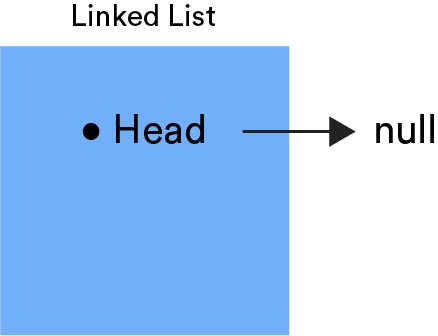
Any linked list starts with a head property that references the first node. When we start sketching, the list is empty. So, we’ll set the head pointer as null, because we don’t yet have other nodes or data values.
Visualize It : 2
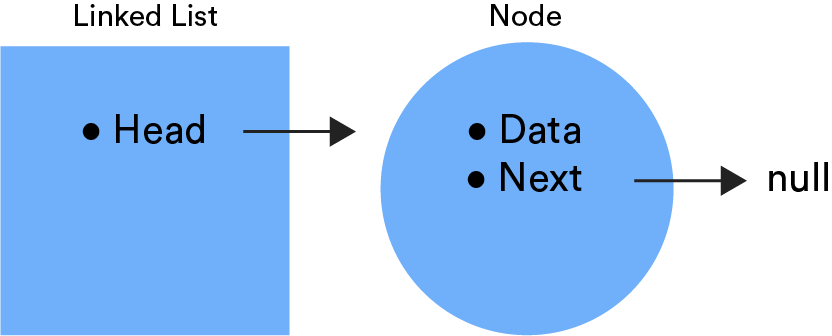
The default (and easiest) place to add more nodes to a linked list is at the end of the list.
Remember, the first node must be set as the head. To this, we’ll add a next pointer and the new node with data.
By default, this new node won’t need a pointer, because it will be the last node in the list. So, the pointer will have a null value for now.
Visualize It : 3
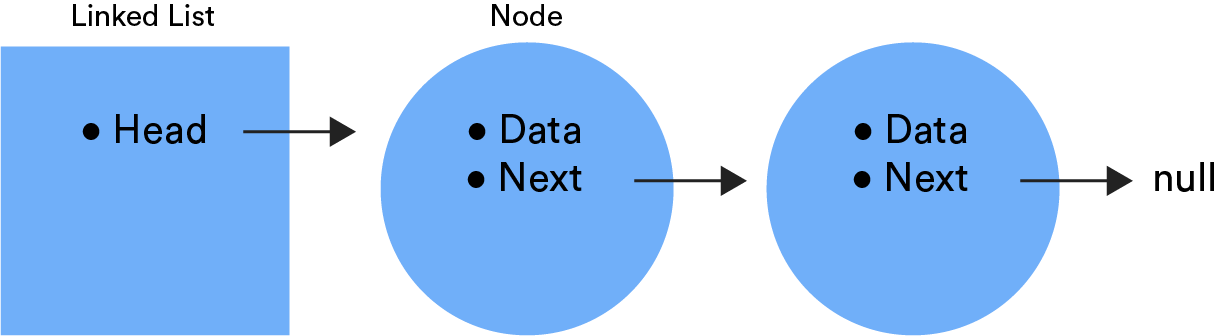
For all future nodes that we add, we can find the last node by looking for the node with null as its next value. Once we find it, we can change its next property to now point to the new node we’re inserting into the list.
Traversing a Linked List
In order to search for a specific value, access a specific point, or insert a value in a linked list, we first need to write code that traverses that list.
Traversing has to start at head and then use the next pointers to iterate through the list:
let walker = this.head;

while (walker.next) {
  walker = walker.next;
}
In our example, the walker variable conveys the idea that the variable “walks” through a list one node at a time. The next property points the walker variable to the next node in the list and continues to do so until we reach a node that doesn’t have a next property. That’s the end!
But, that’s just how we make the code traverse the list. If we want to search for a specific value or access a specific point in the list, we could write a conditional inside the loop to read each node as we go.
The Importance of Next Pointers
Ultimately, manipulating a linked list comes down to changing the pointer values of various nodes. If you’re inserting or removing nodes in a list, it’s critical to ensure that your next pointers never lose reference to the rest of the list.
Inserting a new node at the end of a list is pretty straightforward. But placing one at the front or in the middle of a list can quickly get messy. If a next pointer is broken (that is, if it’s not pointing to the actual next value), the rest of the list will be impossible to reference.
We won’t go into the complexities of how to reset your next properties here, but it’s an important concept to keep in mind when you start building and manipulating linked lists.
Singly vs. Doubly Linked Lists
It’s also important to note that so far we’ve been describing singly linked lists. Think about it: These lists point in one direction — ahead — to the next node in the list.
On the other hand, a doubly linked list first points in one direction but then allows us to traverse the list backward, too. We can move easily from first to last node and then back from last to first node.
To understand how this works, let’s recall the properties of a node in a linked list. Both singly linked and doubly linked lists share these properties:
- A
dataproperty that stores a value. - A
nextproperty, sometimes called a “pointer,” that points to the next item in the list.
But the nodes in doubly linked lists have one additional property:
- A
previousproperty points to the previous item in the list.
The upside of a doubly linked list is that it gives you more mobility than a singly linked list. The downside is that this makes adding or removing values much more complicated, because there are now two pointers — next and previous — that must be managed as you do so.

Uses for Linked Lists
It’s uncommon for a linked list to be used by itself. More often, it’s the basis for other data structures, particularly stacks and queues.
What does this look like? Think of a playlist of songs on your favorite music streaming service. That’s a doubly linked list, because each song points to both the previous and next songs.
Another example is an image viewer: Images are linked to both the previous and next images.
Some file systems are also built as linked lists based on the way they store data. Files are often stored in chunks, but when they get too large, they might not fit into the original chunk. Those “chunks” are just nodes of data with links to the next section of a file that’s stored in another node.

Let’s Talk About Interviews
Linked lists are a common topic that comes up in technical job interviews. You can check out 20 example questions here. Some highlights include:
- Implementing a linked list.
- Adding or removing nodes from a linked list.
- Traversing a linked list.
Often, these concepts will appear as whiteboarding problems, so you won’t need to know how to code a linked list — just how to draw it and explain it conceptually. This tool can help you visualize adding, removing, and searching for values in a linked list.

Linked Lists in Interviews

Transcript
One of the interviewers came in and said we were going to whiteboard an algorithm, so I said, “Fine!” He said, “We’re going to do linked lists,” and then said, “I have to admit, I don’t know how to solve this problem, but let’s just see where we go.” So we started!
I’m more a visual person, so the thing that was really great when I learned algorithms in WDI in San Francisco, and what I do with my students as well, is that I have them act things out and I draw things. I had a very good recall of what, visually, the linked list looked like, so I was able to draw that out and explain it, but I wasn’t able to take it beyond that point. But he was happy with what I had had so far.
end of transcript