Exposing an API Exposing a POST Route
Learning objective: By the end of this lesson, students will be able to create and test a POST route in an Express-based calculator API.
Exposing a POST Route
After successfully implementing the GET route in our calculator API, our next step is to create a POST route. This route is designed to receive user input — a number and an operation (like add or subtract) — and use it to update the calculator’s total.
The complete route is POST /calculator. This setup indicates that we’re expecting to receive data (a number and an operation) to modify the calculator’s state.
Looping back to the main components of building an API:
- Endpoint:
/calculator - Request: A POST request to
/calculatorshould include user-provided data, specifically a number and an operation type. - Response: The API will process the request and return a JSON object showing the updated total.
Before coding the route, we first need to define the expected format of the incoming data. This enables us to handle the data correctly within our API. In this case, we expect the user to send in a number and an operation. For this route, we expect the user to send:
- A number (e.g., 5)
- An operation (e.g., add)
The incoming data should follow this JSON structure:
{
  "number": 5,
  "operation": "add"
}
Building the POST route
We will use the app.post() method to create the route. This route will listen for incoming requests containing a data payload to the /calculator endpoint.
Let’s create the route function and add some details about its logic:
app.post('/calculator', (req, res) => {
  // extract number and operation from request
  // apply operation to total
  // send back the updated total
});
In this route, we want to update the total variable and return the results in a JSON object. We are collecting the data on the incoming request from the req.body object. We expect the incoming request to have the keys number and operation. Let’s start by getting the data from the request and storing it in a variable.
app.post('/calculator', (req, res) => {
  const number = req.body.number;
  const operation = req.body.operation;

  // apply operation to total
  // send back the updated total
});
To update the calculator’s total based on user requests, we need to implement some logic that handles various mathematical operations. For the sake of simplicity, let’s focus on the four most common operations: add, subtract, multiply, and divide. Using a series of if statements we can match the operation specified by the user to the corresponding calculation:
app.post('/calculator', (req, res) => {
  const number = req.body.number;
  const operation = req.body.operation;

  if (operation === 'add') {
    total += number;
  } else if (operation === 'subtract') {
    total -= number;
  } else if (operation === 'multiply') {
    total *= number;
  } else if (operation === 'divide') {
    total /= number;
  } else {
    return res.json({ error: 'Invalid operation' });
  }

  // don't forget to return the total
});
Now that we have updated the total variable, we can return the new total in a JSON object. Use res.json() to send back the result:
app.post('/calculator', (req, res) => {
  const number = req.body.number;
  const operation = req.body.operation;

  if (operation === 'add') {
    total += number;
  } else if (operation === 'subtract') {
    total -= number;
  } else if (operation === 'multiply') {
    total *= number;
  } else if (operation === 'divide') {
    total /= number;
  } else {
    return res.json({ error: 'Invalid operation' });
  }

  // return the total
  res.json({ total });
});
Add status codes
Let’s add two status codes to let our users know the outcome of their requests:
app.post('/calculator', (req, res) => {
  const number = req.body.number;
  const operation = req.body.operation;

  if (operation === 'add') {
    total += number;
  } else if (operation === 'subtract') {
    total -= number;
  } else if (operation === 'multiply') {
    total *= number;
  } else if (operation === 'divide') {
    total /= number;
  } else {
    // status 400 bad request!
    return res.status(400).json({ error: 'Invalid operation' });
  }

  // status 200 ok!
  res.status(200).json({ total });
});
Adding middleware
With our route complete, we are ready to begin testing. But before we can start, we need to do a little more configuration.
Express, in its basic setup, does not automatically handle JSON data in requests. This is because Express is designed to be minimal and unopinionated, giving developers the flexibility to configure it as needed. What this means is that we will need to implement some middleware to help us handle that incoming JSON object.
Luckily, there is an easy way to do this. We can use the built-in express.json() middleware function. This middleware will parse incoming JSON data and add it to the req.body object.
Let’s add this middleware to our application just above where we defined our routes:
const express = require('express');
const app = express();

// middleware to parse JSON data
app.use(express.json());

// routes below
We are using
app.use()to add the middleware to our application.
Now that our API is able to accept JSON data, we are ready to test our route.
Testing in Postman
Back in Postman, make sure you are in the collection Calculator API:
- Click on the
...next to the collection name. - Select
Add Request. Name the requestCalculate. - At the top of the request tab, change the HTTP method to
POST. - Change the URL to
http://localhost:3000/calculator. - Click on the
Bodytab located below the URL bar. - Select
rawoption. - To the right of the tabs, there is a dropdown menu for selecting the data format. Change this to
JSON. - In the text area provided, input the
JSONdata for your test:
{
  "number": 5,
  "operation": "add"
}
Remember to save this request.
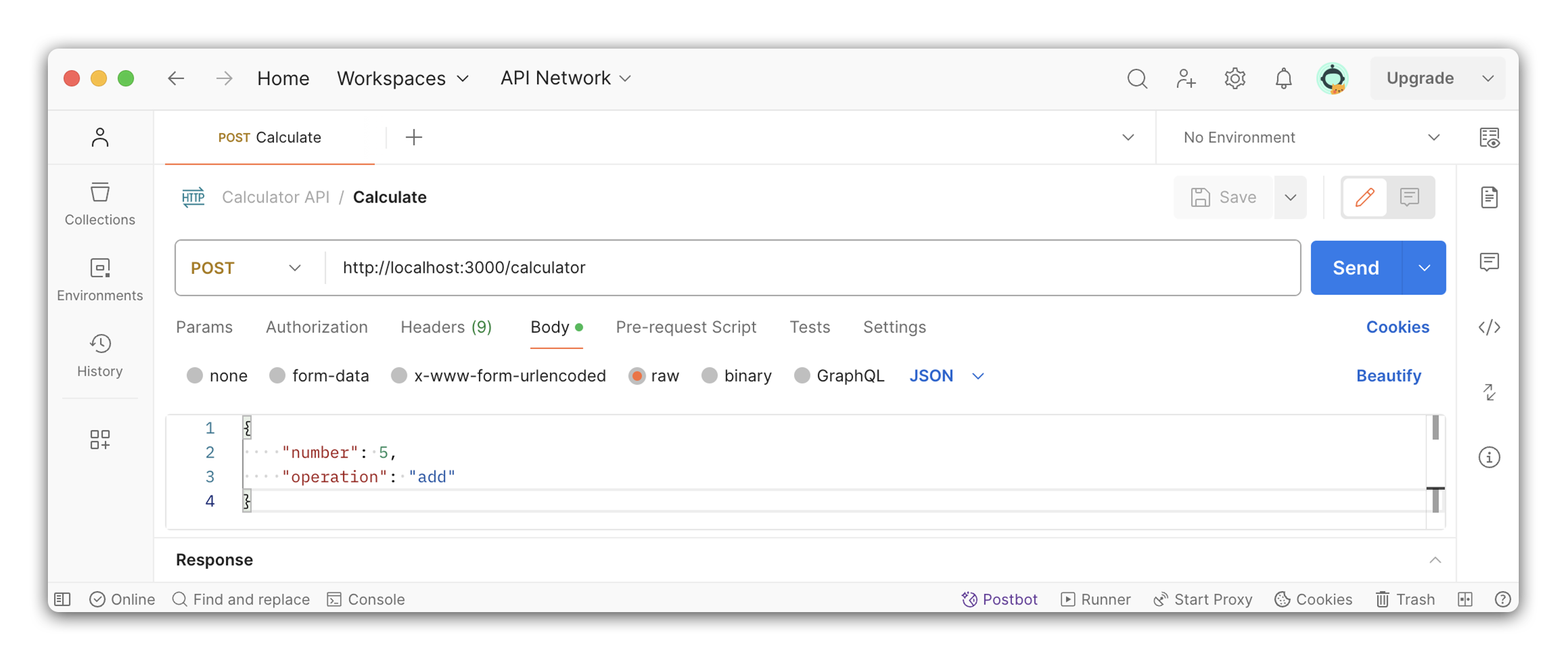
Click the Send button to send the request.
You should see the following response:
{
  "total": 5
}
Great Job! 🎉
You do: Exposing a DELETE route
We have done two routes together, now it’s time to stretch your skills and try one solo. The goal is to create a DELETE route that will reset the total of the calculator.
Use the following components to build this route:
- Endpoint - This endpoint is
/calculator. - Request - Users will make a
DELETErequest to this endpoint and be expected to provide no data. - Response - We will return a status code for
No Content.
If you make a request to GET /calculator following this operation, you should see that the total has been reset to 0.