Intermediate CSS
The box-sizing Property
Learning objective: By the end of this lesson, students will understand what the box-sizing property is and how it works.
What is box-sizing
box-sizing is a CSS property that allows us to control how the width and height of an element are calculated.
By default, when we specify an element’s height and width, we are only setting the height and width of its content. However, when using the border-box value on the box-sizing property, any padding or border of the element is included in the calculation. Note, any margin is not included in border-box.
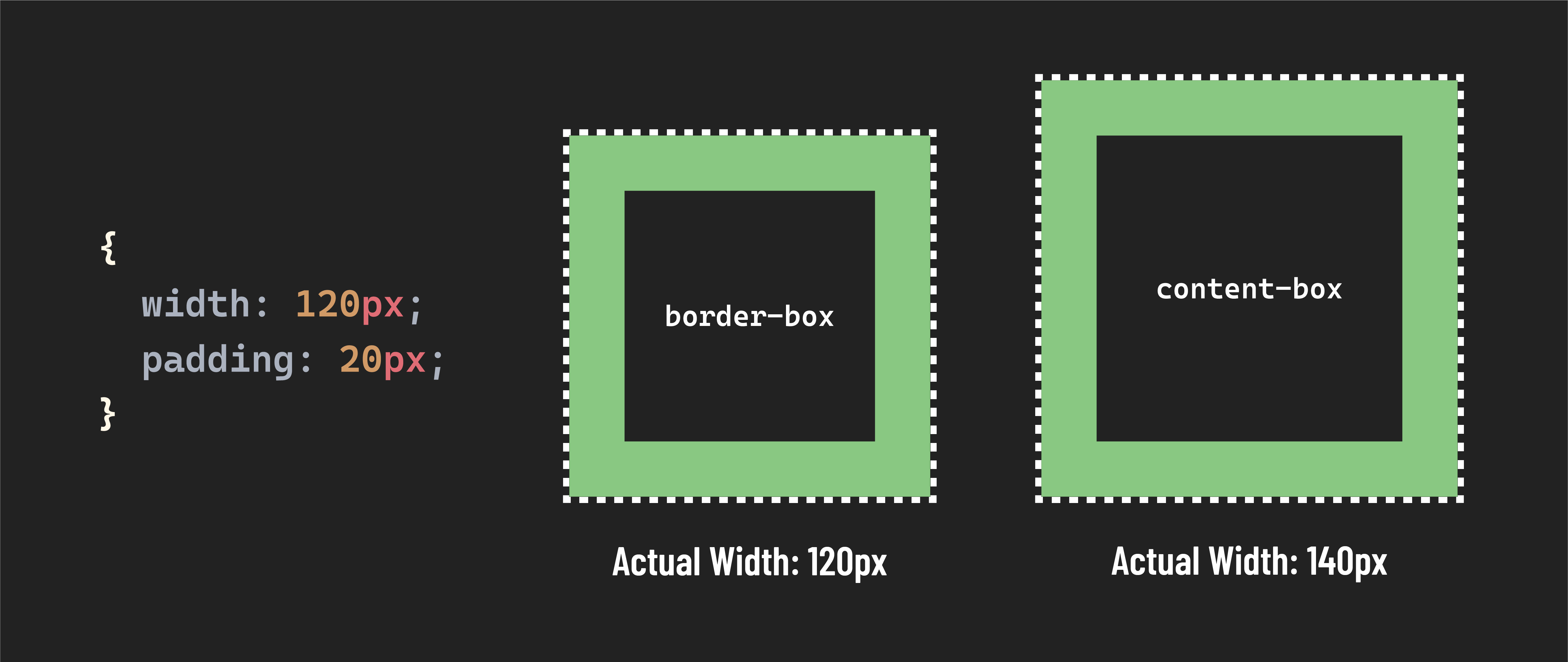
Typically, we want to apply this setting to every element on the page, so we use the * selector to apply this style universally.
* {
  box-sizing: border-box;
}
This is a fantastic rule to apply at the top of your stylesheets and is commonly used in CSS resets (we’ll cover this more in the CSS Boilerplate lesson). Let’s dive into why!
Why use box-sizing: border-box?
Most importantly, this rule makes sizing elements more intuitive - when setting the height or width of an element, that is the exact height or width that element will be. This makes writing CSS much more predictable.
Because we’ve applied box-sizing: border-box universally, we can be sure that the height and width of any element on our page will always be calculated the same way.