
Learning objective: By the end of this lesson, students will understand how to use try...catch blocks in JavaScript to handle errors effectively.
What is a try...catch statement?
The try...catch statement lets us handle errors in our code without stopping the entire program.
try
-
The
tryblock contains code that might cause an error. You are telling the program, “Try to run this code — it might not work.” -
If an error happens inside the
tryblock, the program will immediately move to thecatchblock. Any remaining code in thetryblock will be skipped.
📚 Throwing an error means the code has detected something went wrong and is stopping that part of the program. When this happens inside a
tryblock, the program moves to thecatchblock to handle it.
catch
-
The
catchblock runs only if an error happens in thetryblock. -
It receives an
errorobject that gives details about what went wrong. You can then log the error, show a message to the user, or do something else to recover from the problem.
Anatomy of try...catch
Let’s look at how a try...catch block is structured:
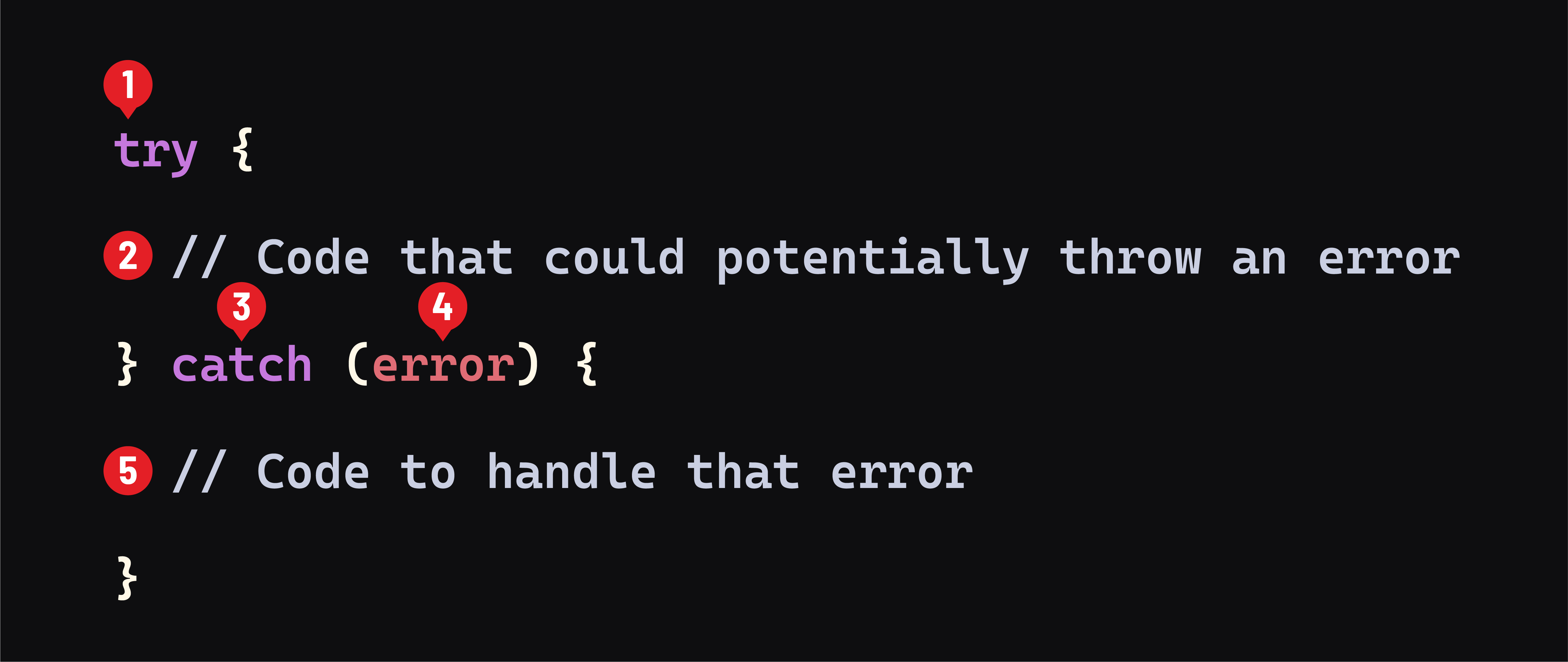
- The
trykeyword starts a block of code to run. - Inside the block, we write the code that might cause an error.
- The
catchkeyword starts another block that runs if an error happens. - The
errorobject (also callederr,e, or another name) holds details about what went wrong. - In the
catchblock, we write the code to handle the error.
The purpose of this structure is to allow our program to keep running, even if something goes wrong.
👉 You can read more about how try...catch works in the MDN documentation.
Using try...catch in asynchronous functions
Why do we need try...catch when working with asynchronous code?
Asynchronous operations (like reading a file, fetching data from a server, or connecting to a database) depend on other systems outside your app. These systems might not work the way you expect — for example, a file might be missing or a server might be offline.
Because of this, asynchronous code is more likely to cause errors, so it’s a good idea to use try...catch to handle problems safely.
Example: Reading a file that doesn’t exist
const readAnotherFile = async () => {
  try {
    // This tries to read a file that does not exist
    const data = await fs.readFile('test4.txt', 'utf8');
    console.log(data);
  } catch (error) {
    // This runs if there is an error (like the file not being found)
    console.log(error);
  }
};

readAnotherFile();
What’s happening in this code:
- The
await fs.readFile(...)line is inside atryblock because it might fail. - If the file does not exist, an error is “thrown” and caught by the
catchblock. - The
catchblock logs the error. In a real program, you could also show a message or try another file.
This way, the program doesn’t crash — it handles the error and keeps running.
Run the code
To test it, run the file in your terminal:
node app.js
You will see an error message in your console:
[Error: ENOENT: no such file or directory, open 'test4.txt'] {
  errno: -2,
  code: 'ENOENT',
  syscall: 'open',
  path: 'test4.txt'
}
That means the file was not found — but instead of crashing, our code caught the error and printed it.
🧠 Error messages can look complicated, but the first line usually explains the problem clearly. In this case, it says:
no such file or directory, open 'test4.txt'This tells us the filetest4.txtcould not be found.