Intro to the DOM
The innerHTML Property
Learning objective: By the end of this lesson, students will be able to use the innerHTML property to insert or update HTML content within a DOM element.
We’ve seen how to take actions on a DOM element, such as setting its text content with the textContent property, but what if we wanted to do something a little more complex, like add HTML inside of a DOM element? For that, there is innerHTML.
The innerHTML property is used to retrieve and set content as HTML in the format of a string.
Let’s check out changing the content of the <p> element by assigning the string Comments for <strong>today</strong>: first to textContent, then to innerHTML:
paragraphElement.textContent = 'Comments for <strong>today</strong>:';
Observe that the HTML tag <strong> prints as plain text. It does not modify the HTML contents of the paragraphElements. Check out innerHTML next:
paragraphElement.innerHTML = 'Comments for <strong>today</strong>:';
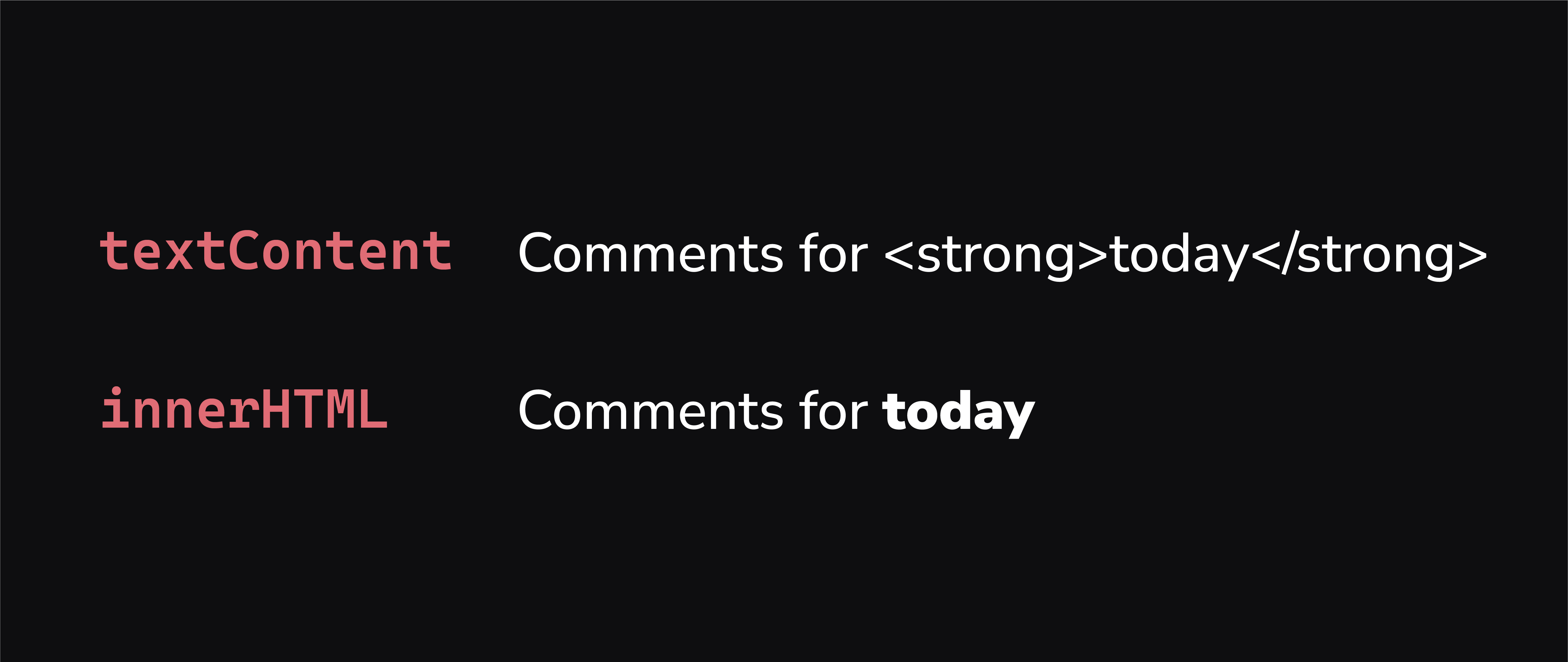
Now, the HTML that we wrote is no longer being interpreted as text but instead as actual HTML. If you want to include HTML, use innerHTML.
The power of innerHTML may not be evident at first. However, the assigned string can be as complex as you want - containing multiple elements with attributes, etc.
🚨 Never use any user-provided values in
innerHTML. This could be dangerous unless the values have been properly cleaned up.