Java Control Flow Conditional Operators
Learning objective: By the end of this lesson, you’ll be able to write Java code utilizing comparison and boolean operators.
An introduction to conditional operators
Operators are special symbols that perform specific operations on one, two, or three operands and then return a result. Conditional operators evaluate conditions and make decisions based on Boolean logic. In other words, after performing the required operation on their operands, conditional operators return the result as a boolean value of true or false. Conditional operators make conditional branching and condition-based iterating of loops possible.
Types of conditional operators
There are three types of conditional operators in Java:
- Relational/Comparison operators
- Logical/Boolean operators
- Ternary operator
Relational/Comparison operators
Relational or comparison operators in Java compare two values and return a Boolean result.
📚 Below, LHS stands for any expression on the left-hand side of the operator, and RHS stands for any expression on the operator’s right-hand side.
| Operator | Operator Description |
|---|---|
== |
Is LHS equal to RHS? |
!= |
Is LHS not equal to RHS? |
< |
Is LHS less than RHS? |
> |
Is LHS greater than RHS? |
<= |
Is LHS less than or equal to RHS? |
>= |
Is LHS greater than or equal to RHS? |
Let’s better understand these relational/comparison operators through a few examples.
Example 1
Verify if two integers are equal:
int x = 10;
int y = 20;
boolean isEqual = (x == y);
System.out.println(isEqual);
// Prints: false
⚠ Notice the difference between using
=as an assignment operator and==as a comparison operator.
Example 2
Verify if two strings are different:
String str1 = "Hello";
String str2 = "World";
boolean isNotEqual = str1 != str2;
System.out.println(isNotEqual);
// Prints: true
Example 3
Verify if a person is a minor:
int age = 16;
boolean isMinor = age < 18;
System.out.println(isMinor);
// Prints: true
Example 4
Verify if a person has got enough points to qualify for a reward:
int points = 120;
int requiredPoints = 100;
boolean qualifiesForReward = points >= requiredPoints;
System.out.println(qualifiesForReward);
// Prints: true
Comparison operator outputs
2 minIn the following exercises, determine what will be printed to the console.
Exercise 1
Determine if we should buy something.
double price = 150.75;
double threshold = 100.00;
boolean isExpensive = price > threshold;
System.out.println(isExpensive);
Exercise 2
Determine if our luggage will be able to fly on a plane.
int weight = 20;
int maxWeight = 25;
boolean isWithinLimit = weight <= maxWeight;
System.out.println(isWithinLimit);
Logical/Boolean operators
Logical operators in Java allow you to combine or invert Boolean expressions, enabling more complex logic. These operators work on true and false values and return a Boolean result. They are often used in conditional checks but can be applied independently for tasks like data validation or logical comparisons.
| Operator | Operator Description |
|---|---|
&& |
Logical AND. Returns true if both LHS and RHS expressions are true. |
\|\| |
Logical OR. Returns true if even one of the expressions, LHS or RHS, is true. |
! |
Logical NOT. Returns the inverted boolean value of the expression that follows it. |
Let’s check out a few examples!
Example 1
Verify that a user inputs a valid username and password before we confirm they are authenticated:
boolean isUsernameCorrect = true;
boolean isPasswordCorrect = false;
boolean isAuthenticated = isUsernameCorrect && isPasswordCorrect;
System.out.println(isAuthenticated);
// Prints: false
Example 2
Negate a condition based on another mutually exclusive condition:
boolean isWeekend = false;
boolean isWeekday = !isWeekend;
System.out.println(isWeekday);
// Prints: true
Logical operator outputs
2 minIn the following exercises, determine what will be printed to the console.
Exercise 1
Check if a customer can get a discount:
boolean hasPromoCode = false;
boolean isPrimeMember = true;
boolean eligibleForDiscount = hasPromoCode || isPrimeMember;
System.out.println(eligibleForDiscount);
Exercise 2
Let’s combine more than one logical operation in a single statement:
boolean isEmployee = true;
boolean hasAccessCard = false;
boolean canAccessOffice = isEmployee && !hasAccessCard;
System.out.println(canAccessOffice);
Exercise 3
What if we combine logical and relational operators?
int age = 25;
boolean isStudent = true;
boolean getsFreeEntry = (age < 18 || age > 60) || isStudent;
System.out.println(getsFreeEntry);
Ternary operator
Let’s look at one more conditional operator - the ternary. In Java, the Ternary operator ? is a shorthand for conditional expressions. It is used solely to evaluate a condition and return an expression. It has this syntax:
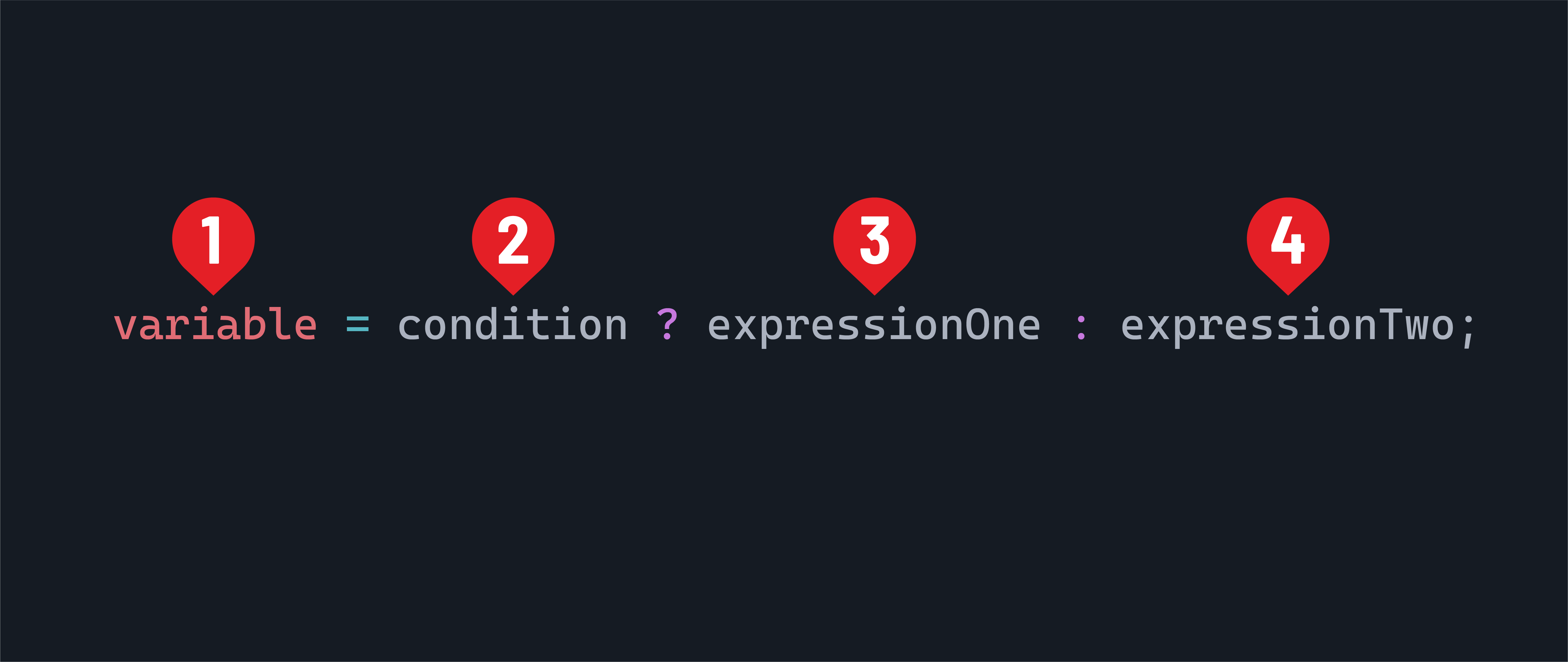
- A variable to create or assign to.
- The condition to evaluate.
- If the condition is determined to be
true, the result of this expression will be assigned to the variable. - If the condition is determined to be
false, the result of this expression will be assigned to the variable.
int speed = 80;
int speedLimit = 60;
String status = (speed >= speedLimit) ? "Speeding" : "Within Limit";
System.out.println(status);
Summary of operators
Oracle’s Java documentation has a handy summary of operators that may be useful as you’re learning this syntax.