
Contents
Deliverable details:
- Project planning deliverable
- GitHub repo deliverable
Submitting deliverables:
- Submitting your deliverables
Project planning deliverable
Planning is vital to build anything more than the most trivial of applications; therefore, this is where you will begin your journey with this project. You shouldn’t write any code or set up a GitHub repo for your project until an instructor approves your planning materials.
Building your planning materials
Use Trello for your project planning work. This video has some helpful tips to get started using Trello if you’ve never used it before. Check out this Trello support article to make your planning materials publicly available.
🚨 It is vital that you make your project planning publicly accessible; otherwise, no one can see it! Check out this Trello support article to learn how!
Details
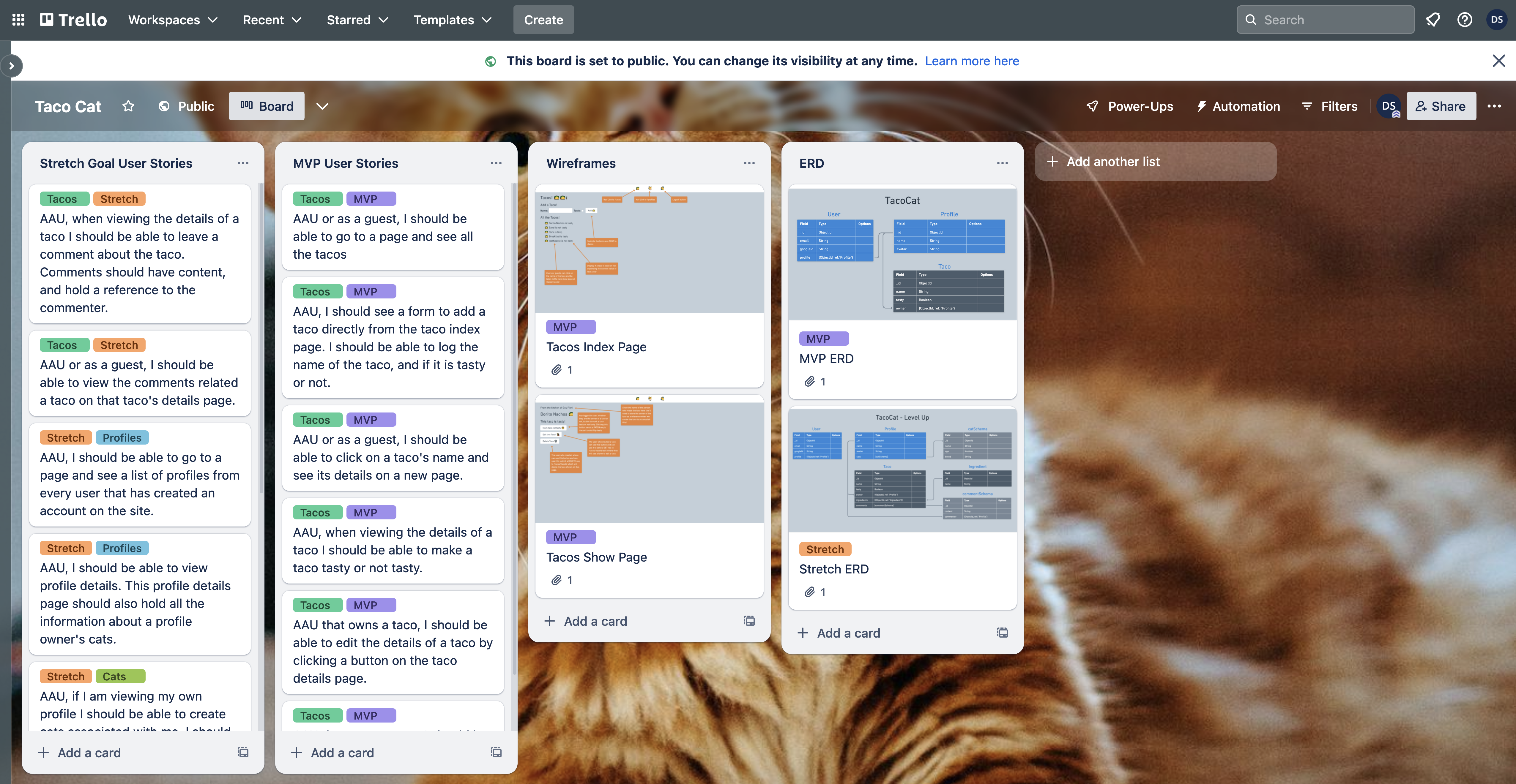
You will submit a public Trello board with these project planning details:
- MVP user stories, written in the following template: As a [user role], I want [feature], so that [reason]. If the reason is obvious, it can be excluded.
- Wireframes for your app’s main pages. For example, if you were building a blogging app, you might have wireframes for a landing page, the posts index page, and the add post page.
- An ERD for your app’s data and the relationships between that data.
To organize this information, set up the Trello board for your project with the following lists:
- MVP User Stories: To hold your MVP user stories. Each user story should be an individual card in the list.
- Wireframes: To hold the wireframes for your app. Each wireframe should be an individual card on the list. You may also want to include Wireframes built with your stretch goals in mind. If you do this, ensure that these cards are clearly labeled.
- ERD: To hold the ERD for your project. You may want to include an ERD built with your stretch goals in mind as well. If you do this, ensure it is clearly labeled on a separate card.
During planning, you may want to include additional user stories that describe stretch goal features that go beyond the project requirements. Ensure these are in a separate list called Stretch Goal User Stories on your Trello board.
An example of an acceptable Trello board submission is shown here:
Using Trello during project week
Some students like to use Trello during project week to keep track of their work. While you’re more than welcome to do this, it is not a project requirement, and the method you use to organize your work is ultimately up to you!
GitHub repo deliverable
After your project proposal has been approved, you’ll need to set up a GitHub repo for your project.
🚨 As a reminder, you should use the same repo or keep all the repos you use for the entire duration of your project to meet the project requirements.
Submitting your deliverables
Follow the guidelines below to submit your deliverables for this project.
Submitting your planning materials
Submit a link to your publicly visible planning materials below in the following format:
Project planning link: <link>
Replacing <link> (including the < and >) with a link to your project planning materials.
Submitting your GitHub repo link
Submit a link to the public GitHub repo that you are using for your MEN Stack CRUD App Project below in the following format:
GitHub repo link: <link>
Replacing <link> (including the < and >) with a link to your GitHub repo.