Skyrockit Build the Application Schema
Learning objective: By the end of this lesson, students will be able to define an application schema and embed it within the user model.
Use the ERD as a guide
We already created an Entity Relationship Diagram (ERD) and decided to embed the application data inside the user model.
Embedding means we do not need to create a separate file for the application schema or connect it by importing or exporting between files. Instead, we define the application schema in the same file as the user schema and create the connection there.
Let’s begin by defining the applicationSchema and linking it to the userSchema.
In models/user.js, add the following code:
// models/user.js

const applicationSchema = new mongoose.Schema({
  // properties of applications
});

const userSchema = new mongoose.Schema({
  username: {
    type: String,
    required: true,
  },
  password: {
    type: String,
    required: true,
  },
  applications: [applicationSchema], // embed applicationSchema here
});
Focus on the applications field inside userSchema. It is an array of embedded application schemas, which allows each user to store multiple job applications.
Notice that we defined applicationSchema before using it in userSchema. This order is important — the structure of the nested data must be created first.
Define the structure of an application
Let’s think about our original user story:
As a user, I want to be able to add new job applications that I’m thinking about applying to or have already applied to. For each job, I should be able to note down important information like the company’s name, the job title, what stage the application is at, and if I want, some personal notes and the link to the job posting.
This user story tells us that each application should include:
- Company name
- Job title
- Status of the application
- Notes (optional)
- Link to the job posting (optional)
Let’s update our ERD with these fields:
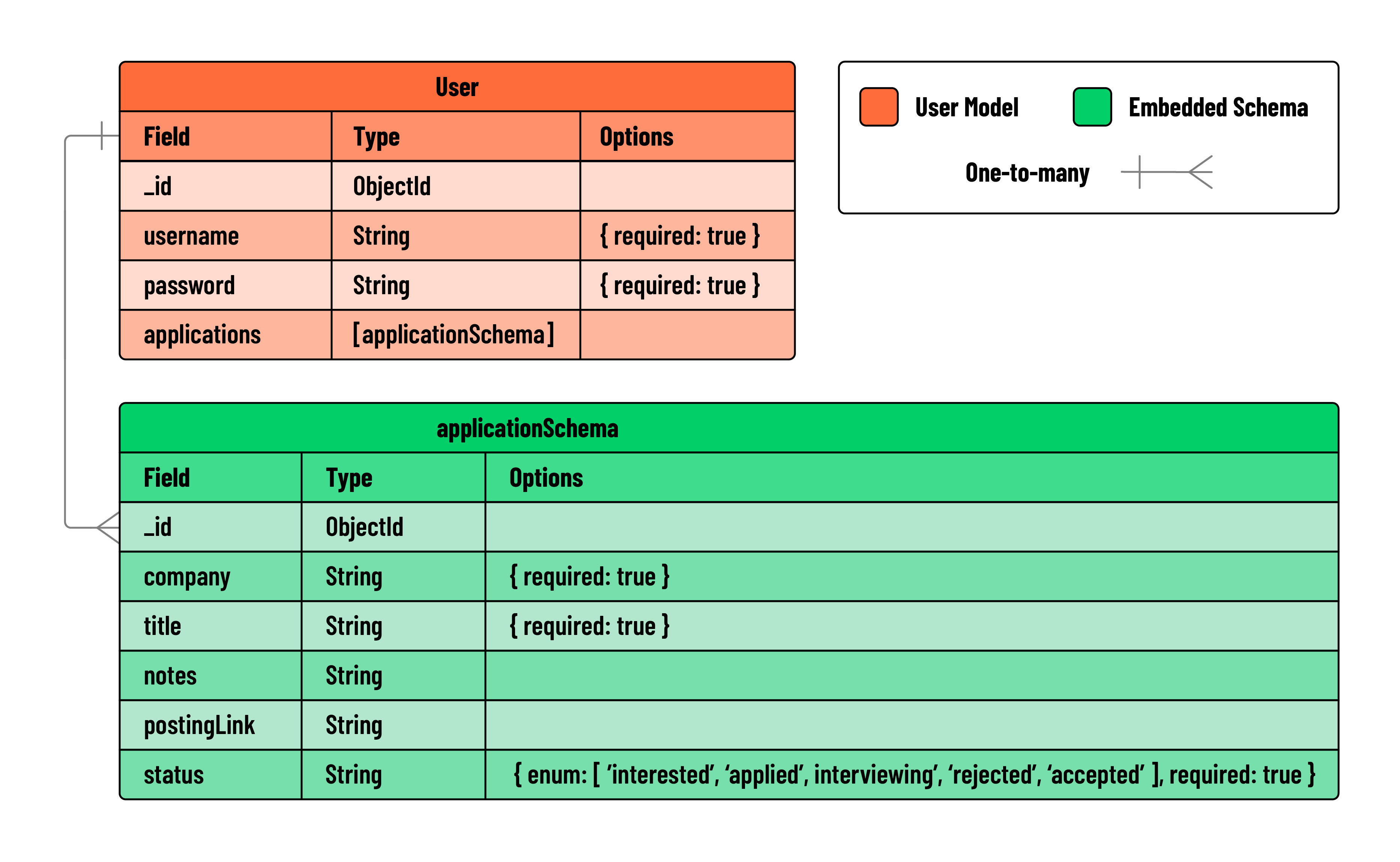
Based on this, we can say that "company" and "title" should be required, while the rest are optional.
Note: MongoDB will automatically add an _id field to each embedded application, so we do not need to define it manually.
Now, let’s update the schema with the required fields:
// models/user.js

const applicationSchema = new mongoose.Schema({
  company: {
    type: String,
    required: true,
  },
  title: {
    type: String,
    required: true,
  },
  notes: {
    type: String,
  },
  postingLink: {
    type: String,
  },
  status: {
    type: String,
    enum: ['interested', 'applied', 'interviewing', 'rejected', 'accepted'],
  },
});
That’s it! We have now completed the applicationSchema and embedded it inside the user model.