Playing Audio in the Browser The Audio Class
Learning objective: By the end of this lesson, students will be able to make use of a built-in JavaScript class and successfully add audio to an application.
Built-In Audio Class
In this lesson, we’ll be using the built-in JavaScript Audio class in conjunction with an HTMLAudioElement to be able to play sounds when a user interacts with the browser.
The HTMLAudioElement API
Playing audio in the browser is straightforward, thanks to:
- HTML5’s
<audio>element, which can be added to any webpage (multiple instances if need be). - The HTMLAudioElement DOM interface that can be used to create an audio element in code using JS.
The Audio Class
The Audio class allows us to create new instances (objects) that will play the intended sounds when a user interacts with our app. We just need to tell the Audio class what should be assigned to the new instance, which we will do by passing in an argument.
Let’s start with the cat. The first thing we’ll do is set up a cached element reference for the cat image:
const catImg = document.querySelector('#cat')
To test out our cached element, we’ll attach an event listener to the reference we just set up (catImg) and console.log() the event target when the image is clicked:
catImg.addEventListener("click", (evt) => {
  console.log(evt.target)
})
In order to set up a new HTMLAudioElement, all we need to do is initialize a variable using the new keyword and the built-in JavaScript Audio class, with the following syntax:
const catSays = new Audio('../assets/audio/cat.mp3')
Once we’ve done that, catSays is a new instance of the Audio class, which has all of the built-in values and methods of the Audio class available. We can play the audio file by invoking the play() method! Don’t forget to adjust the volume so you don’t melt your user’s ears:
catImg.addEventListener("click", (evt) => {
  catSays.volume = .05
  catSays.play()
})
Try clicking on the cat image now!
The DOM element being created is an instance of HTMLAudioElement.
However, it inherits its useful properties & methods from the HTMLMediaElement class.
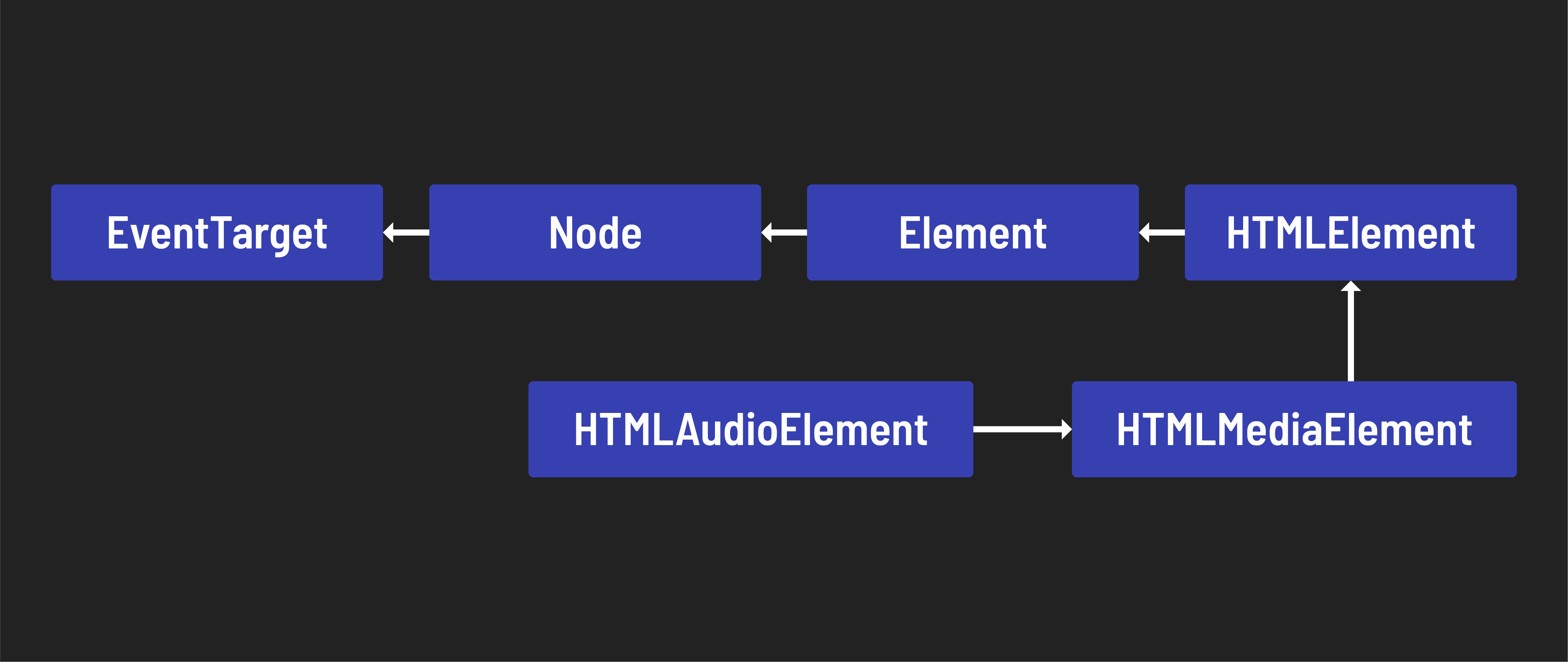
The object hierarchy of the HTMLAudioElement provides a great example of the power of inheritance in Object Oriented Programming.
🎓 You Do
Now that the cat makes sounds, we need to get the other animals doing the same. That will be up to you.
Here is some commented pseudocode of the steps we used to get the cat meowing. You can reference this here, or even paste it into your own code to help you out:
// Add event listener to <element>
// Listen for click on cached <element> and on a click:
  // make sure an image has been selected
    // Get the element id and use it to create an Audio instance/element!
    // Fix its volume
    // Play the audio element!
Good luck and have fun!