RESTful Routing RESTful Routing Conventions
Learning objective: By the end of this lesson, students will be able to create a RESTful routing chart for a resource.
RESTful Routing Conventions
RESTful routing is a set of best practices for organizing the interactions between a client and a server. Understanding the purpose and function of each route in a RESTful architecture is important for designing and building scalable and maintainable web applications.
Let’s break down the RESTful routing chart for a “blogs” resource to help you better understand each route and its purpose.
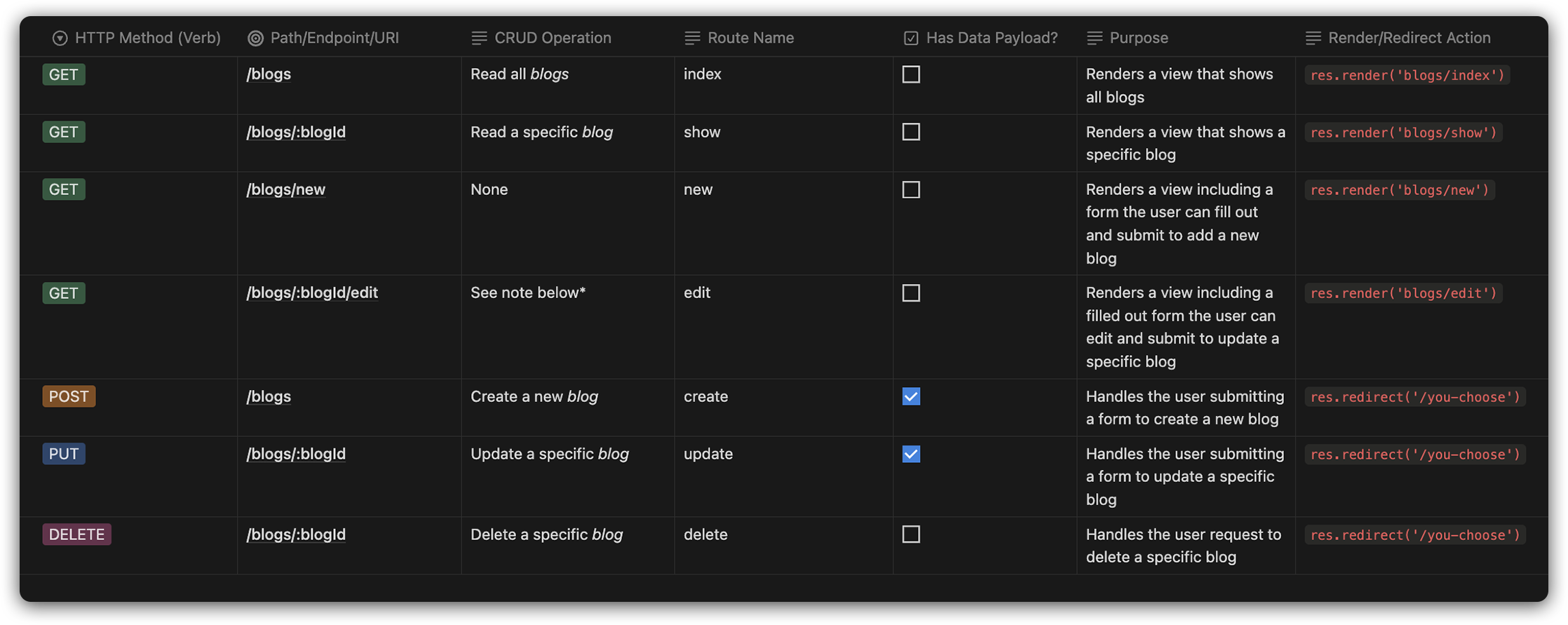
*NOTE: The
editroute may optionally read data for a specific blog to pre-fill data in the form that will ultimately be rendered to the user.
If a route is marked as having a data payload, it means there is data that will be sent from the client to the server with the request.
The inclusion of new and edit as RESTful is debatable in some circles, but many of the resources you find will include them, and for simplicity, we have grouped them with the other RESTful routes as well. Check out this writeup for more details.
Here is a more accessible code version of the same chart:
| HTTP Method (Verb) | Path/Endpoint/URI     | CRUD Operation            | Route Name | Has Data Payload? | Purpose                                                                                            | Render/Redirect Action        |
| ------------------ | --------------------- | ------------------------- | ---------- | ----------------- | -------------------------------------------------------------------------------------------------- | ----------------------------- |
| GET                | `/blogs`              | Read all _blogs_          | index      | No                | Renders a view that shows all blogs                                                                | `res.render('blogs/index')`   |
| GET                | `/blogs/:blogId`      | Read a specific _blog_    | show       | No                | Renders a view that shows a specific blog                                                          | `res.render('blogs/show')`    |
| GET                | `/blogs/new`          | None                      | new        | No                | Renders a view including a form the user can fill out and submit to add a new blog                 | `res.render('blogs/new')`     |
| GET                | `/blogs/:blogId/edit` | See note below*           | edit       | No                | Renders a view including a filled out form the user can edit and submit to update a specific blog  | `res.render('blogs/edit')`    |
| POST               | `/blogs`              | Create a new _blog_       | create     | Yes               | Handles the user submitting a form to create a new blog                                            | `res.redirect('/you-choose')` |
| PUT                | `/blogs/:blogId`      | Update a specific _blog_  | update     | Yes               | Handles the user submitting a form to update a specific blog                                       | `res.redirect('/you-choose')` |
| DELETE             | `/blogs/:blogId`      | Delete a specific _blog_  | delete     | No                | Handles the user request to delete a specific blog                                                 | `res.redirect('/you-choose')` |

*NOTE: The `edit` route may optionally read data for a specific blog to pre-fill data in the form that will ultimately be rendered to the user.
Creating RESTful routing charts
As a new web developer, understanding RESTful routing is key to building organized web applications.
Here’s why creating and using a RESTful routing chart is important for you:
- Organizing your routes: This chart will be your roadmap for organizing standard HTTP methods and their corresponding CRUD operations. It’s like having a cheat sheet that clearly shows you which route does what in a RESTful API.
- Planning your projects: Before you dive into coding your next big project, this chart will help you lay out all the routes you need. It’s a bit like planning the chapters of a book - you’ll know what each part should do, making your time coding efficient and more organized.
- Create Useful Documentation: Imagine you’re creating documentation for your application. This routing chart can be a part of that - providing clear and concise instructions on how others can use your application’s backend routes.
- Working in teams: When working on group projects, it’s important that everyone speaks the same ‘route’ language. This chart ensures that all team members understand and agree on what each route in your application should do, avoiding confusion and mismatches in your project.
Now lets look at a simplified version of the chart above:
| HTTP Method | Path/Endpoint | CRUD Operation | Route Name | Description |
|---|---|---|---|---|
| GET | /puppies |
Read | index |
Display a list of all puppies. |
| GET | /puppies/new |
Read | new |
Show a form to add a new puppy. |
| POST | /puppies |
Create | create |
Add a new puppy to the list. |
| GET | /puppies/:puppyId |
Read | show |
Display a specific puppy’s details. |
| GET | /puppies/:puppyId/edit |
Read | edit |
Show a form to edit an existing puppy’s details. |
| PUT | /puppies/:puppyId |
Update | update |
Update a specific puppy’s details. |
| DELETE | /puppies/:puppyId |
Delete | delete |
Remove a specific puppy from the list. |
As a student, you’ll more often be asked to create simplified RESTful routing charts like the one here. It’s a more concise way to outline the same detailed information above.