SQL II Filtering, NULLs, and Joins Intro to SQL Module II
This module covers advanced SQL concepts including CASE statements, subqueries, Common Table Expressions (CTEs), and window functions. We’ll continue using BigQuery’s public ncaa_basketball dataset.
To be able to follow along you need to have sucessfully setup your Google Cloud Project, BigQuery Sandbox, and have access to the ncaa_basketball dataset. If you haven’t done so, please look at the Setup file in SQL-I.
Data set: bigquery-public-data.ncaa_basketball
Learning Objectives:
- Write SQL queries that contain conditional logic by using
CASE. - Construct subqueries for multi-step operations.
- Practice common table expressions (CTEs) with
SELECTstatements to simplify complex queries. - Build Window Frames in SQL using
OVERandPARTITION BYto group subsets of data.
Contents
- Part 1: Complex Conditions with
CASE - Part 2: Subqueries
- Part 3: Common Table Expressions (CTEs)
- Part 4: Window Functions
- Query Order Reminder
Part 1: Complex Conditions with CASE
What is CASE used for?
Imagine you want to categorize teams by their venue size in order to carry out some analysis. You have a table containing both the team name and the venue capacity, and you want to create a new column that classifies each team as either “Large Arena”, “Medium Arena”, or “Small Arena”.
In SQL, you can use CASE statements to define the conditions for these categories based on the venue capacity, making it easy to label each record accordingly.
Let’s see what this looks like in SQL:
-- Categorize teams by venue size
SELECT
    name AS team_name,
    venue_capacity,
    CASE
        WHEN venue_capacity >= 20000 THEN 'Large Arena'
        WHEN venue_capacity >= 10000 THEN 'Medium Arena'
        WHEN venue_capacity > 0 THEN 'Small Arena'
        ELSE 'Unknown'
    END AS arena_size
FROM bigquery-public-data.ncaa_basketball.mbb_teams
ORDER BY venue_capacity DESC;
CASEis the keyword that starts the CASE statement.WHENchecks if a condition is true.THENspecifies the value (or expression) to return if that condition is true.ELSEspecifies the default value (or expression) to return if none of the preceding conditions are true.ENDmarks the end of the CASE statement.ASis used to give the new column a name.
Note:
CASEstatements:- Can be used in the
SELECTclause,WHEREclause, andHAVINGclause. - Can be used in the
GROUP BYclause.
- Can be used in the
- When using
CASEstatements in SQL, keep in mind that you are NOT rewriting the categories permanently in your database. Instead, theCASEstatement calculates and assigns categories “on the fly” in temporary memory during the query execution. This means the underlying data in your tables remains unchanged, and you are simply instructing SQL to display the data in a specific way based on the conditions you define.
Exercise 1.1
Create a query that categorizes games based on attendance and shows the count of games in each category from the mbb_games_sr table.
Instructor Led:
You can also use CASE with aggregations (e.g. COUNT(), SUM(), AVG(), etc.):
-- Count teams in each venue size category by conference
SELECT
    conf_name,
    COUNT(CASE WHEN venue_capacity >= 20000 THEN 1 END) AS large_arenas,
    COUNT(CASE WHEN venue_capacity >= 10000 AND venue_capacity < 20000 THEN 1 END) AS medium_arenas,
    COUNT(CASE WHEN venue_capacity > 0 AND venue_capacity < 10000 THEN 1 END) AS small_arenas
FROM bigquery-public-data.ncaa_basketball.mbb_teams
GROUP BY conf_name
ORDER BY large_arenas DESC;
Part 2: Subqueries
What is a subquery?
A subquery is a query within another query. It allows you to perform complex operations by breaking down a problem into smaller, more manageable parts. Subqueries can be used in the SELECT, FROM, WHERE, HAVING, and ORDER BY clauses.
Some common use cases for subqueries include:
- Filtering data based on the result of another query.
- Calculating aggregate values that depend on the result of another query.
- Creating derived tables for complex joins.
Let’s see what this looks like in SQL. In order to work out hich teams have above-average venue capacity, we first need to know what the average venue capacity is. We can create a query to calculate that, and then use that query within another query to list which teams have a capacity greater than that average:
-- Which teams have above-average venue capacity?
SELECT
    name,
    venue_capacity
FROM bigquery-public-data.ncaa_basketball.mbb_teams
WHERE venue_capacity > (
    SELECT AVG(venue_capacity)
    FROM bigquery-public-data.ncaa_basketball.mbb_teams
)
ORDER BY venue_capacity DESC;
Subqueries can also be used in the SELECT clause:
-- Show each team's venue capacity and the difference from average
SELECT
    name,
    venue_capacity,
    venue_capacity - (
        SELECT AVG(venue_capacity)
        FROM bigquery-public-data.ncaa_basketball.mbb_teams
    ) AS capacity_vs_avg
FROM bigquery-public-data.ncaa_basketball.mbb_teams
WHERE venue_capacity IS NOT NULL
ORDER BY capacity_vs_avg DESC;
Exercise 2.1
Which games had above-average attendance for their season? Use the mbb_games_sr table.
Hint: you will need to use a subquery in the WHERE clause.
Part 3: Common Table Expressions (CTEs)
What is a Common Table Expression?
A CTE (Common Table Expression) is a temporary result set that you can reference within a SELECT, INSERT, UPDATE, or DELETE statement. CTEs help break down complex queries into more manageable and readable pieces.
Common use cases for CTEs include:
- Simplifying complex queries
- Making queries more readable
- Avoiding redundant calculations
Let’s see what this looks like in SQL:
-- What is the average points per game for each team?
WITH team_scoring AS (
    SELECT
        h_name AS team_name,
        AVG(h_points) AS avg_points
    FROM bigquery-public-data.ncaa_basketball.mbb_games_sr
    GROUP BY h_name
),
top_scoring_teams AS (
    SELECT
        team_name,
        avg_points,
        RANK() OVER (ORDER BY avg_points DESC) AS scoring_rank
    FROM team_scoring
)
SELECT *
FROM top_scoring_teams
WHERE scoring_rank <= 10;
Exercise 3.1
Use a CTE to find the average attendance for each team from the mbb_games_sr.
Stretch Exercise 3.1
Use a CTE to find teams that have both above-average venue capacity and above-average game attendance from the mbb_teams and mbb_games_sr tables.
Part 4: Window Functions
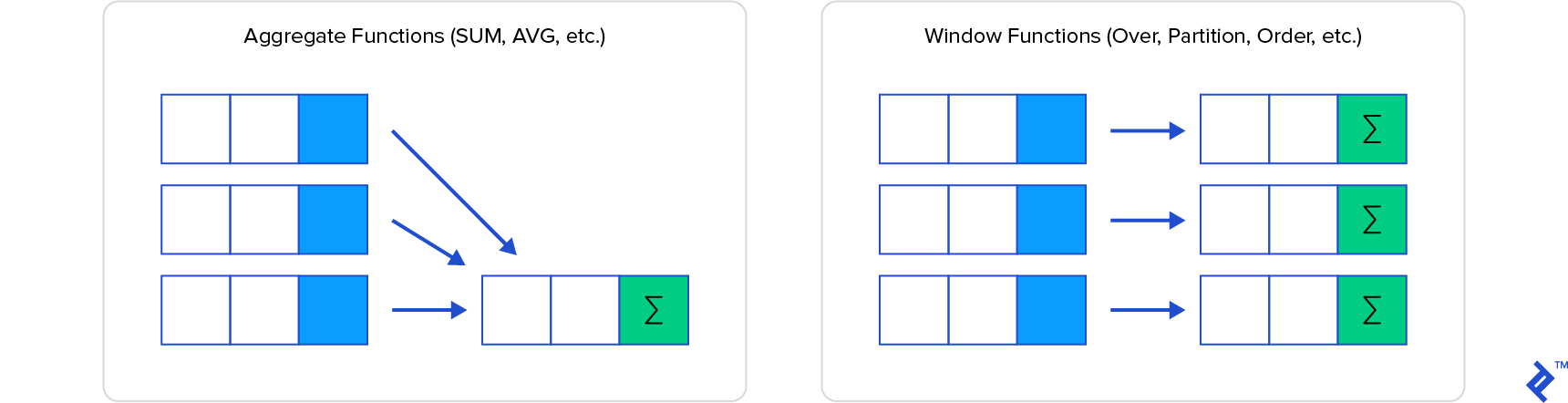
What are window functions? Window functions are a type of SQL function that allows you to perform calculations across rows while keeping row-level detail. In contrast to aggregate functions, which return a single value per group, window functions return a value for each row in the result set.
Here is a visual representation of the difference between aggregate functions and window functions:
Common use cases for window functions include:
- Calculating running totals
- Calculating moving averages
- Calculating rankings
Categories of window functions:
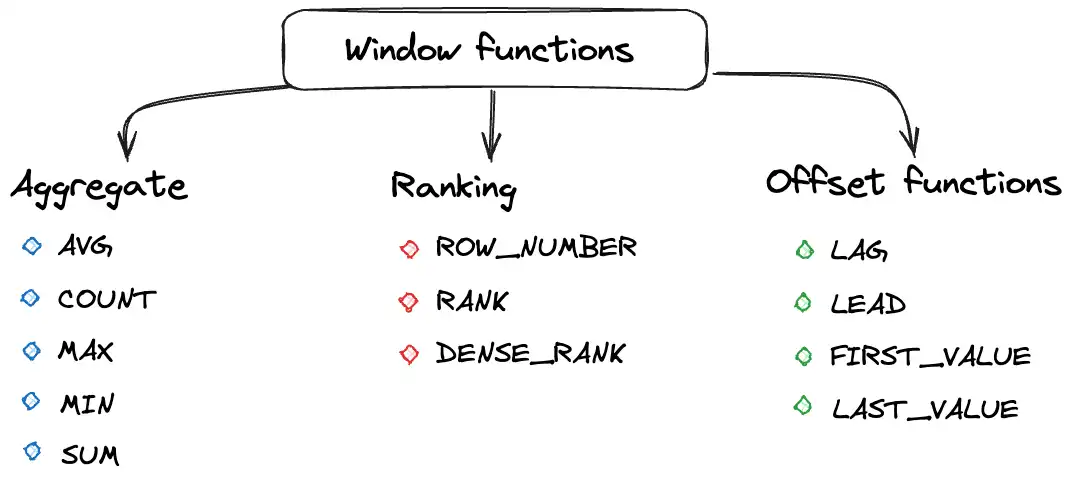
Common window functions explained:
SUM(): Running total of a columnAVG(): Moving average of a columnROW_NUMBER(): Unique row numbersRANK(): Rankings with gapsDENSE_RANK(): Rankings without gapsLAG/LEAD(): Access previous/next rowsFIRST_VALUE/LAST_VALUE/NTH_VALUE(): First/last/nth values in window
Let’s see what this looks like in SQL:
-- Calculate running total of points for each team in a season
SELECT
    season,
    scheduled_date,
    h_name AS team,
    h_points AS points,
    SUM(h_points) OVER (
        PARTITION BY season, h_name
        ORDER BY scheduled_date
    ) AS running_total_points
FROM bigquery-public-data.ncaa_basketball.mbb_games_sr
WHERE season = 2017
ORDER BY team, scheduled_date;
Exercise 4.1 Create a query that shows each team’s average attendance and their ranking within their conference.
Recap In this lesson you have had an introduction to:
CASEstatementsSUBQUERIESCTEsWINDOW FUNCTIONS
Query Order Reminder
Your SQL clauses have to be in a specific order, otherwise you’ll throw an exception.
WITH(CTEs) - optionalSELECT- What columns do you want?FROM- Which table?JOIN- Combine data from multiple tablesWHERE- What conditions must be met?GROUP BY- What groups do you want to see?HAVING- What conditions must be met for groups?ORDER BY- How do you want to order the results?LIMIT- How many rows do you want to return?
WINDOW FUNCTIONS are normally defined within the SELECT statement. However, they can also be defined within the ORDER BY clause (for sorting).
Mnemonic: “With Smelly Feet Will Give Horrible Odors, Lingeringly”